 coderccb
js
1. 封装工具类函数
1. 数字转换文本
传入一个数字,可以根据数字转化成显示为 亿、万文字显示的文本;
Math.floor():向下取整
语法糖的概念:一种简写或者特殊的写法,这种写法相对于原有的写法更加的方便或者阅读性更强;相比于原来的写法,有一点点的甜头,称之为
语法糖- 10_0000_0000 就是 1000000000 语法糖
Click me to view the code
// 封装一个工具函数: 对数字进行格式化
function formatCount (count) {
  var result = 0
  // 大于10亿的情况下进行转换
  if (count >= 10_0000_0000) { // 1_0000_0000 es6的语法糖
    // result = `${Math.floor(count / 1_0000_0000)}亿` 模版字符串
    result = Math.floor(count / 1_0000_0000) + "亿"
  } else if (count >= 10_0000) { // 大于10万的情况下进行转换
    result = Math.floor(count / 1_0000) + "万"
  } else {
    result = count
  }
  return result
}

console.log(formatCount(87_6663_3333)) // 87亿
console.log(formatCount(543_3322)) // 543万
console.log(formatCount(13687)) // 136872. 位数不足补充情况
传入一个数,判断长度是否达到要求,如果不足,就以xxx补充,利用 String.prototype.padStart() / String.prototype.padEnd()
Click me to view the code
function padLeft(content, count, padStr) {
  // 1.如果没有传入参数,默认使用

  // 1.1 长度
  count = count || 2

  // 1.2 补充内容
  padStr = padStr || "0"

  // 2.保证传入的类型必须是String
  // content = String(content)
  content = content.toString()

  // 3.调用padStart方法实现左填充操作,并返回结果
  return content.padStart(count, padStr)
}

console.log(padLeft(3)) // "03"Click me to view the code
function padRight(content, count, padStr) {
  // 1.如果没有传入参数,默认使用

  // 1.1 长度
  count = count || 2

  // 1.2 补充内容
  padStr = padStr || "0"

  // 2.保证传入的类型必须是String
  // content = String(content)
  content = content.toString()

  // 3.调用padEnd方法实现右填充操作,并返回结果
  return content.padEnd(count, padStr)
}

console.log(padRight(3)) // "30"3. 提取百/分/秒
传入一个3位数的值,从中分别提取 百 / 分 / 秒
Click me to view the code
var message = 123

// 3
console.log(message % 10)

// 1
console.log(Math.floor(message / 100))

// 2
console.log(Math.floor(message / 10) % 10)📢: 👆🏻的方法也适用于 时间戳转换具体的 时 / 分 / 秒 ,只需要把 10 换成 60 即可
2. 函数的使用
1. 递归函数
递归函数: 自己调用自己,但是必须有结束条件
Click me to view the code
// 实现一个自己的幂函数pow(pow单词可以表示指数的意思)
  //  x^n = x * x^(n-1)

  // 1. es6
  function pow(x, n) {
    // 结束条件
    if (n === 1) return x
    return x ** n
  }
  console.log(pow(2, 3)) // 8

  // 2. Math.pow
  console.log(Math.pow(2, 3)) // 8

  // 3. 递归(函数自己调用自己,但是必须要有结束条件)
  function pow1(x, n) {
    // 结束条件
    if (n === 1) return x
    return x * pow1(x, n - 1)
  }
  console.log(pow1(2, 3)) // 8

  // 4.for循环
  function pow2(x, n) {
    // 结束条件
    if (n === 1) return x
    var result = 1
    for (var i = 0; i < n; i++) {
      result *= x
    }
    return result
  }
console.log(pow2(2, 3)) // 8Click me to view the code
// 斐波那契数列

// 数列 1 1 2 3 5 8 13 21 34 55 ... x
// 位置 1 2 3 4 5 6 7  8  9  10 ... 100

// 分析
// f1 = 1
// f2 = 1
// f3 = f1 + f2 = 3 -> fn = fn-1 + fn-2 ✅

// 1.递归函数
function fn(n) {
  if (n === 1 || n === 2) return 1
  return fn(n - 1) + fn(n - 2)
}
console.log(fn(8)) // 21

// 2.for循环
function fn(n) {
  // 结束条件
  if (n === 1 || n === 2) return 1

  var total = 0, num1 = 1, num2 = 1
  for (var i = 3; i <= n; i++) {
    total = num1 + num2
    num1 = num2
    num2 = total
  }
  return total
}
console.log(fn(8)) // 212. 回调函数
回调函数: 作为参数传给另一个函数的函数,然后在外部函数内部调用该回调函数以完成某些操作
高阶函数: 传入一个或多个函数 / 输出一个函数
回调函数 也是一个 高阶函数
// 1.定义一个foo函数,传入一个回调函数作为参数
function foo(fn) {
  // 在函数内部调用该回调函数,已完成某些操作
  bar()
}

// 2.定义一个bar函数,作为回调函数的参数
function bar() {
  console.log("bar~")
}

// 3.调用foo调函数,传入一个回调函数bar作为参数
foo(bar)// 代码重构
// 1.定义一个foo函数,传入一个bar回调函数作为参数
function foo(bar) {
// 在函数内部调用回调函数,以完成某些操作
bar()
}
// 2.调用foo函数,传入一个匿名函数作为回调函数bar的参数
foo(function () {
console.log("bar~")
})3. 立即执行函数
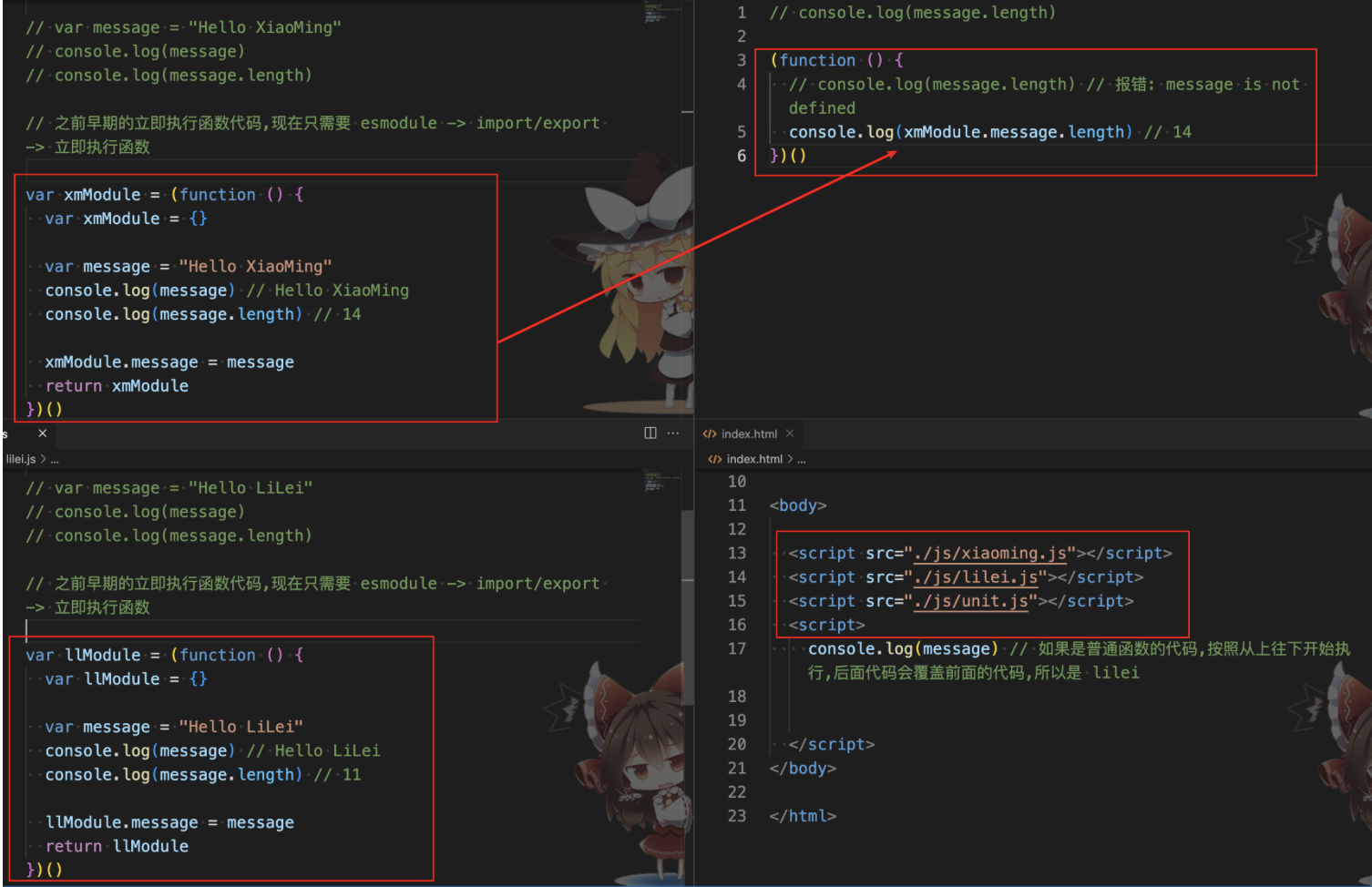
一个函数定义完后被立即执行
- 前面的(),定义了一个匿名函数,函数有自己独立的作用域
- 后面的(),表示这个函数被执行了
应用场景:
- 防止全局变量命名冲突
- 应用场景二:点击某个按钮,显示第几个按钮被点击了
Click me to view the code
js// 1.获取元素 var btnEls = document.querySelectorAll("button") // 2.循环遍历元素 for (var i = 0; i < btnEls.length; i++) { var btnEl = btnEls[i]; // 监听元素的点击 (function (m) { btnEl.onclick = function () { console.log(m + 1) } })(i) }
3. 对象
1. 对象的类型
- 对象字面量: 通过{}
Click me to view the code
// 定义一个person对象
var person = {
  name: "coderccb",
  age: 25,
  friend: {
    name: "coderwhy",
    age: 39
  },
  play: function () {
    console.log("playing~")
  }
}

// 访问对象属性
console.log(person.name) // "coderccb"
console.log(person.friend.name) // "coderwhy"
person.play() // "playing~"

// 添加对象属性 / 修改对象属性 都是通过 = 赋值
person.age = 18
person.address = "深圳市"

// 删除对象属性
delete person.age- new Object() + 动态添加属性
Click me to view the code
// 定义一个person对象
var person = new Object
person.name = "coderccb"
person.age = 25,
person.friend = new Object
person.friend.name = "coderwhy",
person.friend.age = 39
person.play = function () {
  console.log("playing~")
}
console.log(person)

// 访问对象属性
console.log(person.name) // "coderccb"
console.log(person.friend.name) // "coderwhy"
person.play() // "playing~"

// 添加对象属性 / 修改对象属性 都是通过 = 赋值
person.age = 18
person.address = "深圳市"

// 删除对象属性
delete person.age- new 其他类
details Click me to view the code
// 定义一个Person类
function Person(name, age) {
  this.name = name
  this.age = age

  this.Friend = function(name, age) {
    this.name = name
    this.age = age
  }

  this.play = function(){
    console.log("playing~")
  }
}

var person = new Person("coderccb", 28)
var friend = new person.Friend("coderwhy", 39)
console.log(person, friend)

// 访问对象属性
console.log(person.name) // "coderccb"
console.log(friend.name) // "coderwhy"
person.play() // "playing~"

// 添加对象属性 / 修改对象属性 都是通过 = 赋值
person.age = 18
person.address = "深圳市"

// 删除对象属性
delete person.age:::
2. 对象的遍历
对象的遍历(迭代):表示获取对象中所有的属性和方法。
- Object.keys() 方法会返回一个由一个给定对象的自身可枚举属性组成的数组;
// 对象的遍历
var info = {
  name: "ccb",
  age: 18,
  height: 1.88
}

var infoKeys = Object.keys(info) // [name, age, heigth]

for (var i = 0; i < infoKeys.length; i++) {
  var key = infoKeys[i]
  var value = info[key]
  console.log(key, value)
}- for...in
// 对象的遍历
var info = {
  name: "ccb",
  age: 18,
  height: 1.88
}

for (var key in info) {
  var value = info[key]
  console.log(key, value)
}4. 栈和堆
内存分为栈内存(stack)和堆内存(heap)
栈内存存放的是原始类型,在变量中保存的是值本身,也就是值类型
堆内存存放的是对象类型,在变量中保存的是对象的引用,也就是引用类型
var obj1 = {}
var obj2 = {}
// 在堆内存中开辟的内存地址不同
console.log(obj1 === obj2) // false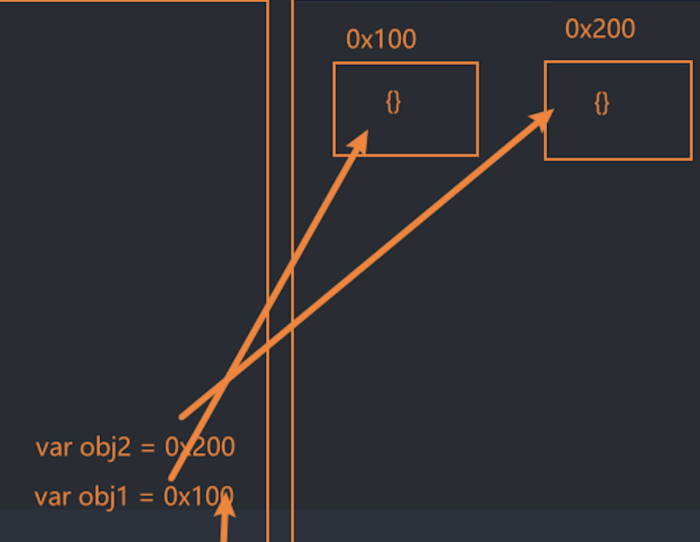
var info = {
  name: "ccb",
  friend: {
    name: "kobe"
  }
}

var friend = info.friend // { name: "kobe" }
friend.name = "james" // { name: "james" }
console.log(info.friend.name) // james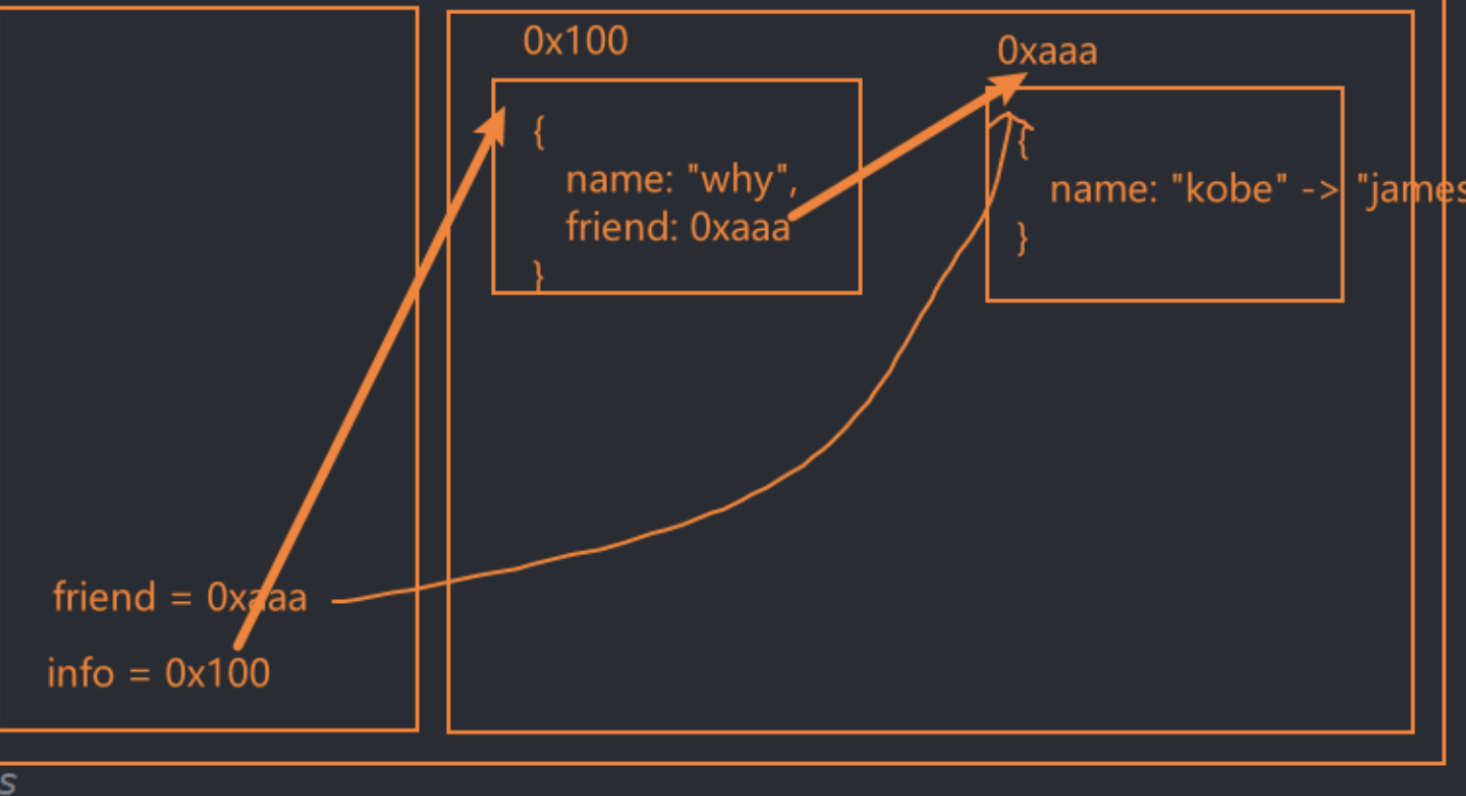
// 值传递
function foo(a) { // a = m -> a = 100
  a = 200
}
var num = 100
foo(num)
console.log(num) // 100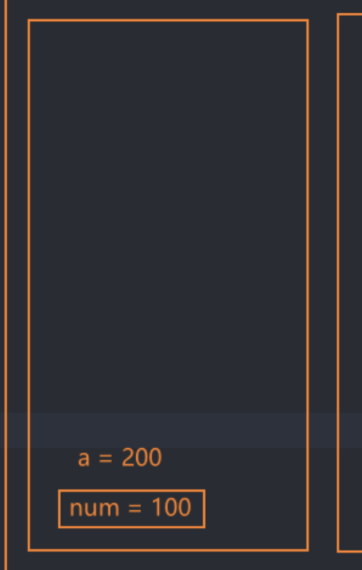
function foo(a) { // a = obj -> { name: "obj" }
  a = {
    name: "ccb" // a = { name: "ccb" }
  }
}

var obj = {
  name: "obj" // obj = { name: "obj" } 不变
}
foo(obj)
console.log(obj) // { name: "obj" }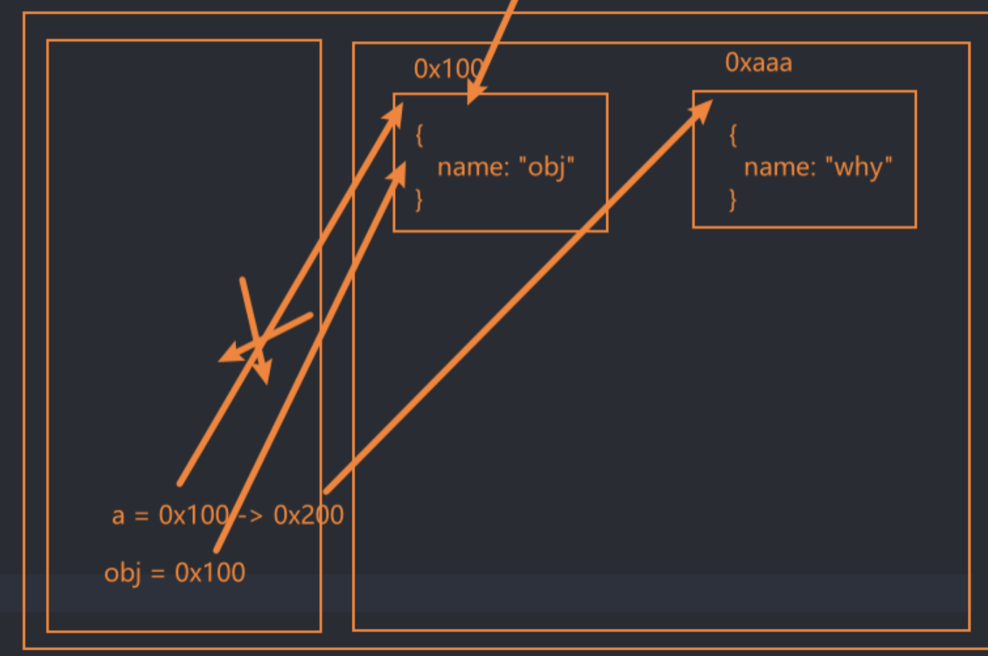
function foo(a) { // a = obj -> a = { name: "obj" }
a.name = "ccb" // a = { name: "ccb" } -> obj = { name: "ccb" }
}

var obj = {
  name: "obj"
}
foo(obj)
console.log(obj) // { name: "ccb" }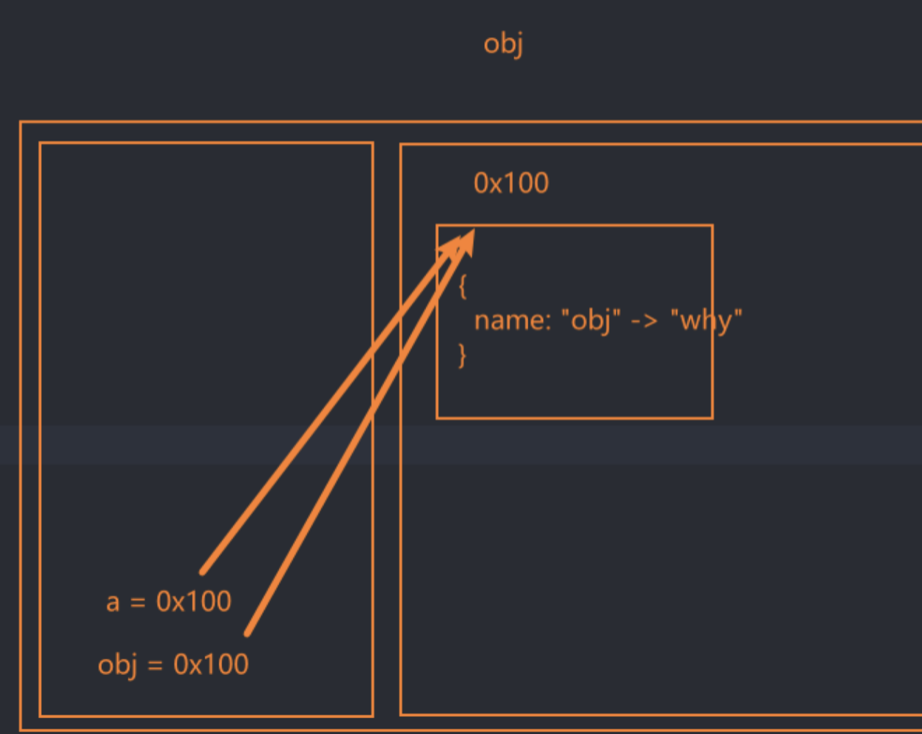
5. this
- 普通函数调用,this指向的是
window对象
function sayHello(name) {
  console.log(this) // 全局对象 window 对象
}
sayHello()var obj = {
name: "ccb",
// 在对象中的函数称为方法
running: function () {
console.log(this) // window
}
}
var fn = obj.running
fn()- 对象的方法调用,this指向的是
调用的对象obj
var obj = {
  name: "ccb",
  // 在对象中的函数称为方法
  running: function () {
    console.log(this) // obj
    console.log(obj) // obj
    console.log(obj === this) // true
  }
}
obj.running()function bar() {
console.log(this) // obj
}
var obj = {
name: "ccb",
bar
}
obj.bar()6. 工厂函数创建对象
工厂函数是一种常见的设计模式,可以解决大量重复的对象创建问题,但是不能获取最真实的类型
Click me to view the code
// 用对象字面量 或者 new Object
// 缺点:存在大量重复代码
var stu1 = {
  name: "张三",
  age: 18,
  height: 1.77,
  address: "北京市",
  running: function () {
    console.log("running~")
  }
}

var stu2 = {
  name: "李四",
  age: 20,
  height: 1.87,
  address: "上海市",
  running: function () {
    console.log("running~")
  }
}

var stu3 = {
  name: "王五",
  age: 19,
  height: 1.88,
  address: "杭州市",
  running: function () {
    console.log("running~")
  }
}Click me to view the code
// ✈️ 工厂函数: 可以解决大量重复的对象创建问题,它是一种常见的设计模式,缺点是不能获取最真实的类型

// 1.定义一个函数createStudent,传入5个不同的参数
function createStudent(name, age, height, address, playing) {
  // 1.1 创建一个新的空对象
  // var stu = {}
  var stu = new Object()

  // 1.2 将传入的参数分别赋值给stu对象的属性
  stu.name = name
  stu.height = height
  stu.age = age
  stu.address = address

  // 1.3 在stu对象创建一个running方法
  // 对象上的函数称之为方法
  stu.playing = function () {
    console.log(stu.name + "正在playing~")
  }

  // 1.4 返回这个stu对象
  return stu
}

// 2. 调用函数createStudent,并传入参数,返回一个新的对象stu1
var stu1 = createStudent("张三", 18, 1.77, "北京市")

var stu2 = createStudent("李四", 29, 1.87, "上海市")

var stu3 = createStudent("王五", 19, 1.88, "杭州市")

console.log(stu1, stu2, stu3) // Object

// 3. 调用对象stu1的playing方法
stu1.playing()
stu2.playing()
stu3.playing()7. 构造函数
什么是构造函数
也称之为构造器,通常就是我们在创建对象时会调用的函数.
在JavaScrip中,构造函数其实是类的扮演者,比如系统默认给我们提供的Date是一个构造函数,也可以看成是一个类.
在es5之前,我们通过function声明一个构造函数,然后通过new关键字来调用.
在es6之后,JavaScript可以像别的语言一样,通过class来声明一个类.
构造函数命名都是采用
大驼峰
Click me to view the code
// 1.定义一个 Stundet 构造函数,并传入4个参数
function Stundet(name, age, height, address) {
  // 1.1 使用this关键字创建对象属性,然后将传入的参数分别赋值给属性
  this.name = name
  this.height = height
  this.age = age
  this.address = address

  // 1.3 使用this关键字给对象添加一个running的方法
  // 对象上的函数称之为方法
  this.running = function () {
    console.log("running~")
  }
}

// 2.通过new关键字调用Stundet 构造函数并传入参数,然后赋值给一个 stu1 的新对象
var stu1 = new Stundet("ccb", 25, 1.65, "深圳市")

console.log(stu1) // Stundet

// 3. 调用 stu1 对象上的 running 方法
stu1.running()Click me to view the code
// 类(构造函数) es6 通过class

// 定义一个 Student 类
class Student {
  // constructor() 是一个构造函数,用于创建 Student 类的实例对象。
  // 构造函数接收4个参数
  constructor(name, age, height, address) {
    // 使用 this 关键字创建对象属性,并将传入的参数赋值给这些属性
    this.name = name
    this.age = age
    this.height = height
    this.address = address
  }

  // 在 Student 类内部定义一个 running 类方法
  running() {
    console.log(this.name + "正在running~") // 输出学生姓名和正在奔跑
  }
}

// 通过 new 关键字调用 Student 类,然后传入参数,创建名为 stu1 的新对象
var stu1 = new Student("ccb", 25, 1.65, "深圳市")

// 输出 stu1 对象的内容
console.log(stu1)

// 调用 stu1 对象上的 running 方法并输出结果
stu1.running()